
cPanel: Creating new email account

Please follow the steps below to create your email account:

1. Login to your cPanel control panel (EG. http://yourdomain.com/cpanel)
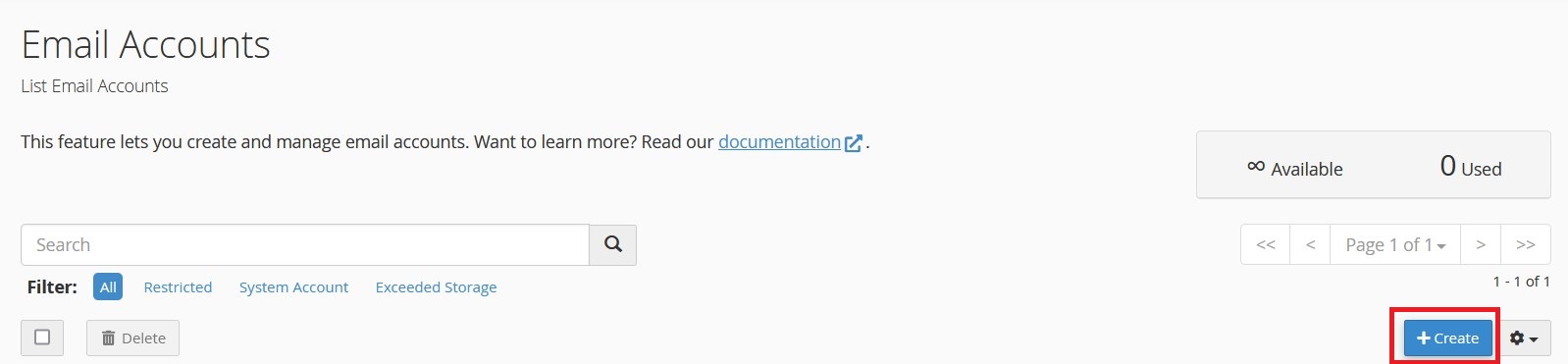
2. Click the icon Email Accounts.
3. Click on Create button.
4. Fill in the following information:
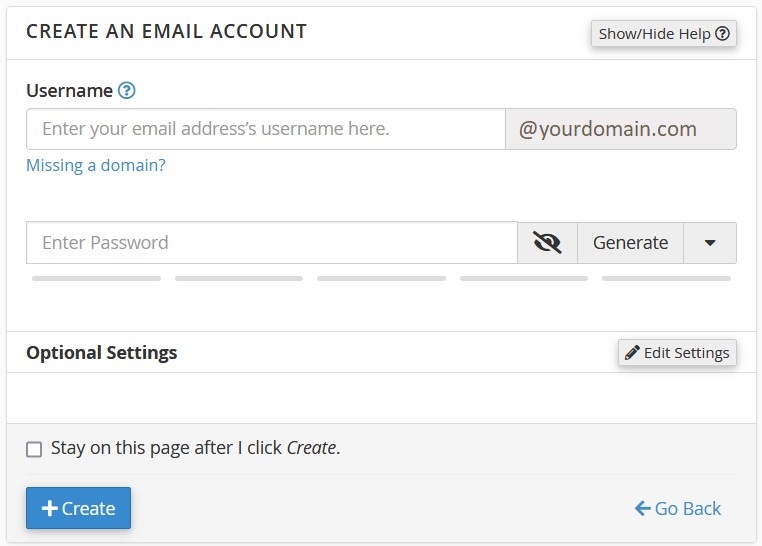
Username: [YOUR EMAIL USERNAME]
Password: [YOUR EMAIL PASSWORD]
* Password strength must be at least 80

5. Click on Create button to start creating the account.

Note: Always use a strong email password that is not easily guessed by other parties.

  • 122 Users Found This Useful
Was this answer helpful?

Related Articles

SolidCP & MSPControl: Create email aliases

Email aliases is an email account that does not store emails, all emails received will be...

cPanel: Migrating calendar from Horde to Roundcube

Horde is about to deprecate from cPanel, email users may migrate their calendar from Horde to...

cPanel: Migrating contacts/address book from Horde to Roundcube

Horde is about to deprecate from cPanel, email users may migrate their contacts or address book...

cPanel: Delete email accounts

Please follow the steps below to delete Email Accounts:1. Login to your hosting control panel...

SolidCP & MSPControl: Creating new email account

Please follow the steps below to create your email accounts:1. Login to your hosting control...