
Accessing Spam Filter Service

There are two ways to access the mail filtering service that you subscribed with us, that is via client account or accessing directly from the spam filtering site.

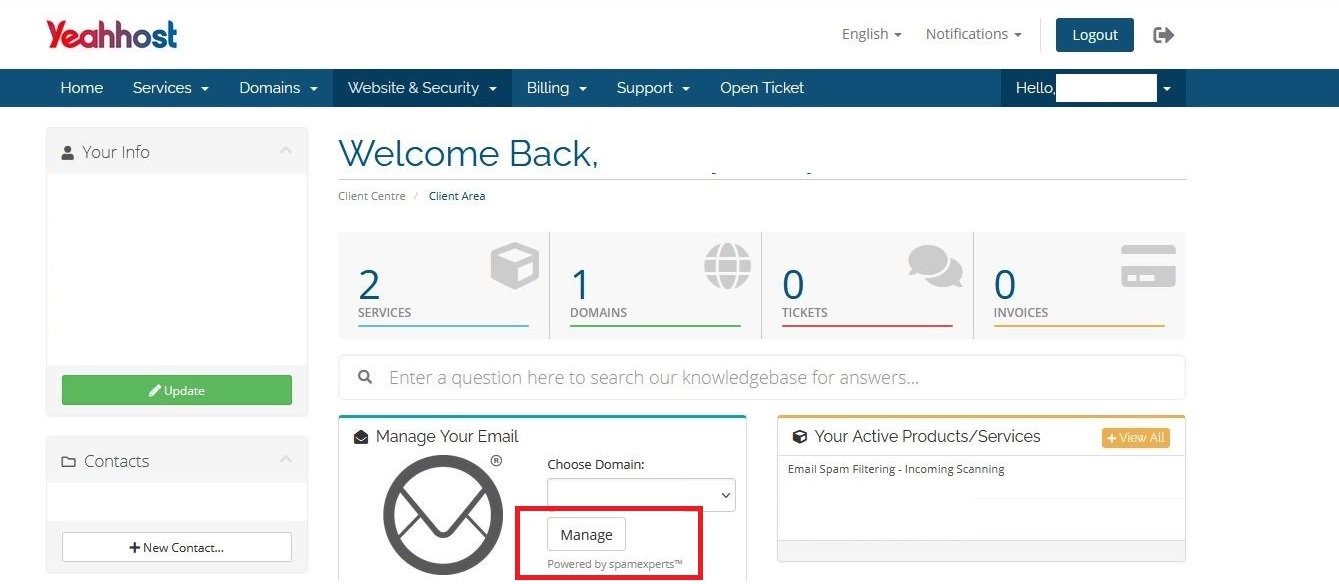
Accessing Spam Filtering Service from Client Area

1. Login to the client area via URL below.
https://cms.yeahhost.com.my/clientarea.php

2. Click Manage button to access SpamExperts admin site.


Accessing Spam Filtering Service from Spam Filtering Site

You may also login to the spam filtering site via URL below.

URL: https://login.antispamcloud.com
Username: [ENTER YOUR DOMAIN NAME]
Password: [ENTER THE PASSWORD TO THE SPAM FILTERING SITE]

Note: Please contact our support team if you require the login information.

  • 1 Els usuaris han Trobat Això Útil
Ha estat útil la resposta?

Articles Relacionats

Managing Attachment Restrictions

The Attachment restrictions page allows you to configure which email attachments to allow and...

Viewing Incoming Mail Transactions

Once the MX record is updated, all incoming mails will go through the spam filtering service.The...

Incoming Sender Block List

Incoming mail received from senders listed in the Sender Block list will always be blocked,...

Spam Quarantine

Spam quarantine holds incoming messages that the filtering system blocks. By default, the...

Train Messages as Spam or Not Spam

If you find spam is not being blocked by the filters or legitimate messages are being blocked as...