
cPanel: Change PHP Version via MultiPHP Manager

You can assign specific PHP version for your website, or change it to a newer PHP version to fulfill your script requirement.
Please follow the steps below to change the PHP version for your website.

1. Login to your hosting control panel (EG. http://yourdomain.com/cpanel).
2. Click MultiPHP Manager icon under "Software" section.
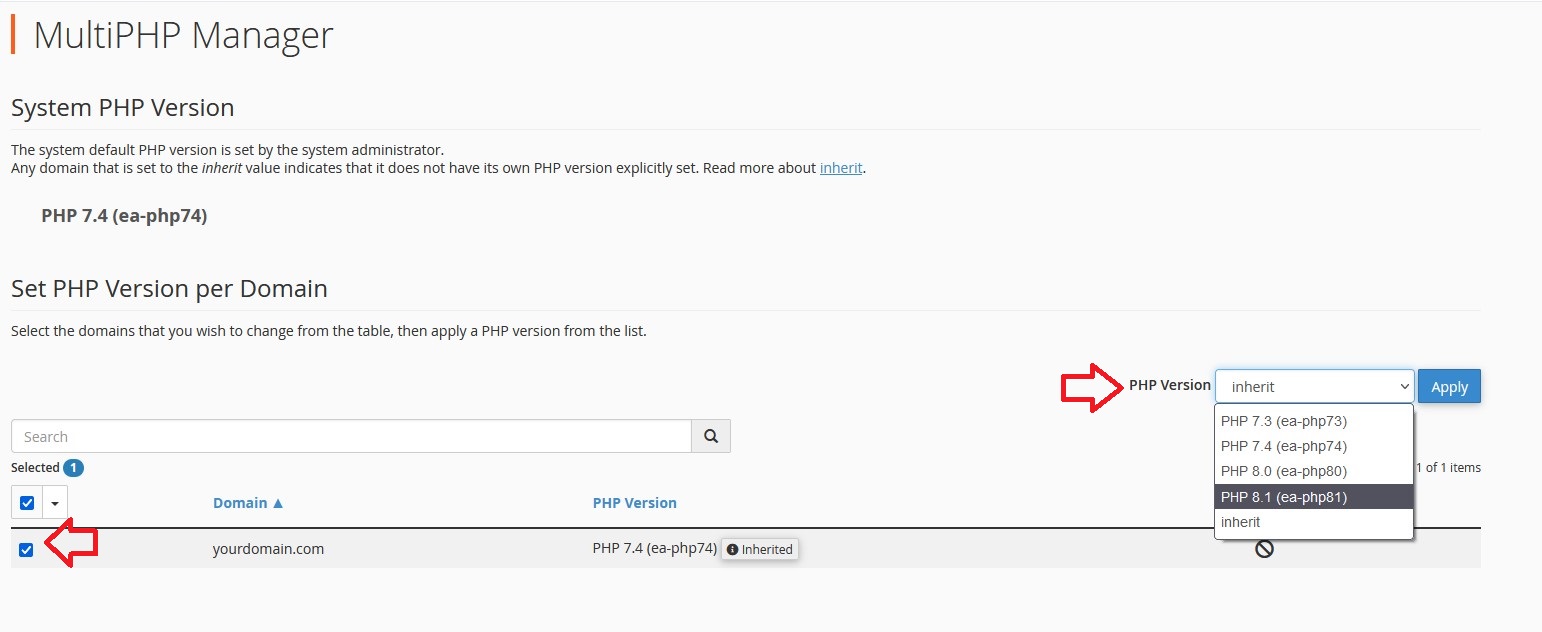

3. Tick on the checkbox beside the domain name.
4. Select the PHP version from "PHP Version" section.
5. Click Apply to save the changes.

Note: Inherit indicates that the website follows the default PHP setting on the server.
Please replace yourdomain.com with your actual domain name.

  • 0 Users Found This Useful
Was this answer helpful?

Related Articles

Search Engin Optimization (SEO)

SEO stands for search engine optimization, it is an attempt made to improve website's rankings in...

cPanel: Redirect URL

URL direction, also known as URL forwarding allows you to redirect your website traffic from one...

SolidCP & MSPControl: Point domain aliases

Please follow the steps below to point your domain aliases to an existing domain.1. Log in to...

Convert .htaccess rewrite rules to web.config

You can use the Import Rules function in IIS to import rewrite rules coding from .htaccess file...

cPanel: Creating Team User

Manage Team is a feature to create and assign additional cPanel user to manage specific roles or...