
cPanel: Redirect URL

URL direction, also known as URL forwarding allows you to redirect your website traffic from one URL to another.
Please follow the steps below to redirect your domain to another URL.

1. Login to your cPanel control panel (EG. http://yourdomain.com/cpanel).
2. Click Redirects icon under "Domains" section.
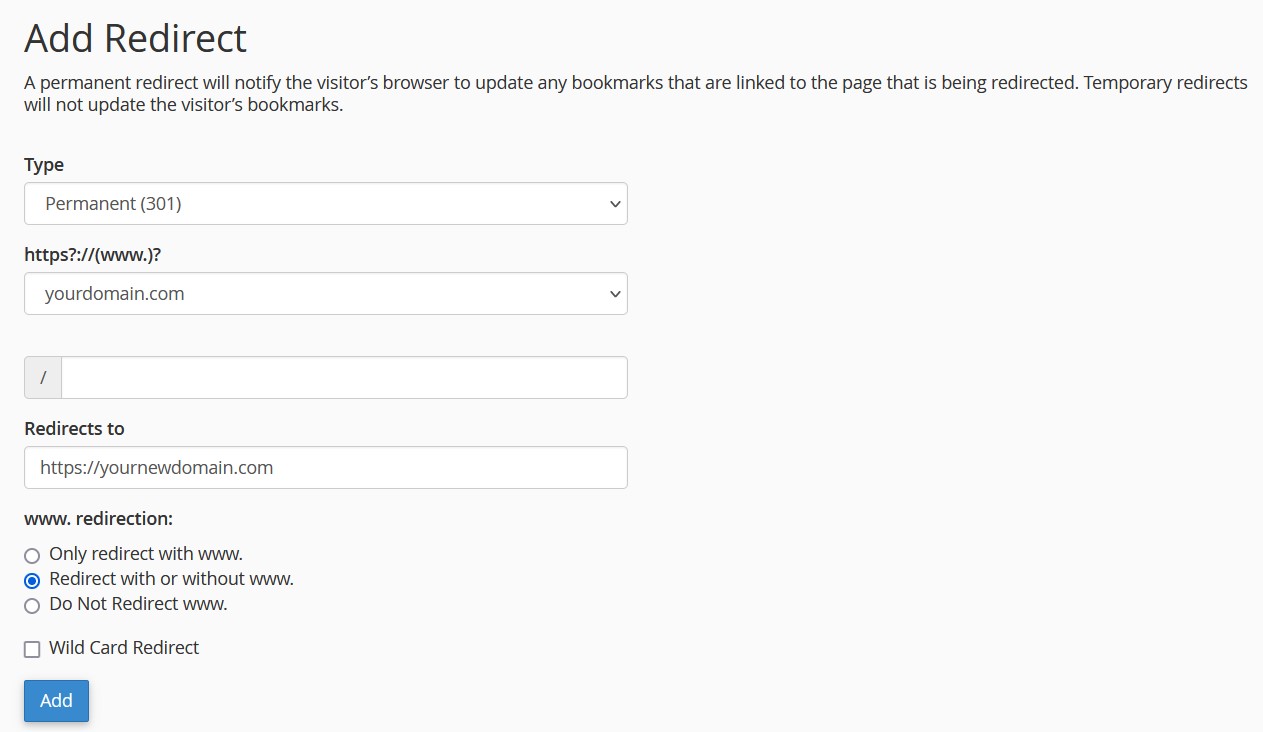
3. For "Type", select "Permanent (301)" to set permanent redirect.
4. Select your domain name from "https?://(www.)?" section.
5. Enter your new domain URL (EG. https://yournewdomain.com) in the "Redirects to" field.
6. For "www. redirection", select "Redirect with or without www."
7. Click Add to save the changes.

  • 0 Users Found This Useful
Was this answer helpful?

Related Articles

cPanel: Change PHP Version via Select PHP Version

With Select PHP Version (also known as PHP Selector), you can change PHP version and enable...

PHP 5.4 has Deprecate the Function SESSION_REGISTER()

The PHP function SESSION_REGISTER() has been deprecated as of PHP version 5.4.Instead, use the...

Disabled PHP Functions

PHP is a popular scripting language that is commonly used to build web pages nowadays.However,...

cPanel: Change PHP Version via MultiPHP Manager

You can assign specific PHP version for your website, or change it to a newer PHP version to...

SolidCP & MSPControl: Creating virtual directories

Please follow the steps below to create virtual directory.1. Log in to your hosting control panel...