
Horde is about to deprecate from cPanel, email users may migrate their calendar from Horde to Roundcube for safekeeping. This involves exporting data from Horde and importing them to Roundcube.
Please refer to the steps below to migrate calendar from Horde to Roundcube.
Exporting calendar from Horde
1. Login to your webmail and select Horde
2. Click Calendar
3. On the left-side panel, click the pencil icon under "My Calendars". A popup will appear.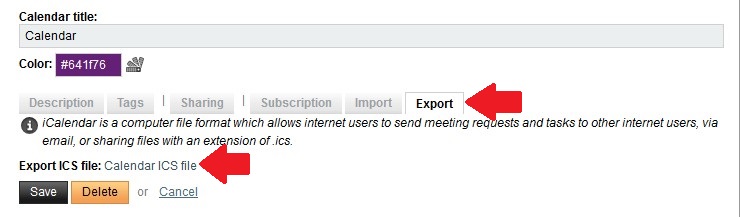
4. Click on Export tab
5. Click Calendar ICS file to start downloading calendar to your local computer
Importing calendar to Roundcube
1. Login to your webmail and select Roundcube
2. On the left-panel, click Calendar
3. Click Import, an Import events window will popup
4. Click Browse to select .ics file from your local computer
5. For "Events from" option, select "All"
5. Click Import to start importing the calendar to Roundcube