
SolidCP & MSPControl: Create email aliases

Email aliases is an email account that does not store emails, all emails received will be forward to another email account.

Please follow the steps below to create your mail aliases:

1. Login to your hosting control panel (EG. http://cp.yourdomain.com, replace "yourdomain.com").
2. Go to to the POP/IMAP EMail icon and then select Mail Aliases.

 2

3. Click the Create Mail Alias button and fill in the following:

E-mail Address: [ENTER A NEW EMAIL ALIASES USER] @ [SELECT YOUR DOMAIN NAME]
Forwards to e-mail: [THE FORWARDING EMAIL ADDRESS]
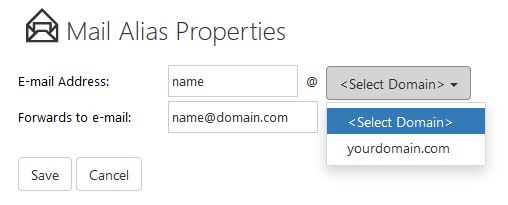
 4

4. Click Save.

* Replace yourdomain.com with your actual domain name.


  • 1 Users Found This Useful
Was this answer helpful?

Related Articles

DirectAdmin: Creating new email account

Please follow the steps below to create your email account in DirectAdmin control panel. *...

SolidCP & MSPControl: Create mailing list

Mailing list is a list of email recipients (maximum 20) group under one virtual email account.You...

SolidCP & MSPControl: Email forwarding

Email forwarder allows email user to automatically redirect incoming emails from one email...

DirectAdmin: Deleting email account

Please follow the steps below to delete email account in DirectAdmin control panel. * Please...

cPanel: Creating new email account

Please follow the steps below to create your email account: 1. Login to your cPanel control...