
SolidCP & MSPControl: Create email aliases

Email aliases is an email account that does not store emails, all emails received will be forward to another email account.

Please follow the steps below to create your mail aliases:

1. Login to your hosting control panel (EG. http://cp.yourdomain.com, replace "yourdomain.com").
2. Go to to the POP/IMAP EMail icon and then select Mail Aliases.

 2

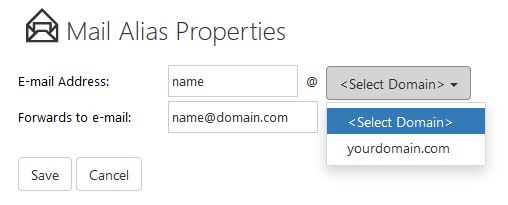
3. Click the Create Mail Alias button and fill in the following:

E-mail Address: [ENTER A NEW EMAIL ALIASES USER] @ [SELECT YOUR DOMAIN NAME]
Forwards to e-mail: [THE FORWARDING EMAIL ADDRESS]
 4

4. Click Save.

* Replace yourdomain.com with your actual domain name.


  • 1 Users Found This Useful
Was this answer helpful?

Related Articles

cPanel: Migrating calendar from Horde to Roundcube

Horde is about to deprecate from cPanel, email users may migrate their calendar from Horde to...

SolidCP & MSPControl: Create mailing list

Mailing list is a list of email recipients (maximum 20) group under one virtual email account.You...

cPanel: Email account forwarders

Email forwarder allows email user to automatically redirect incoming emails from one email...

cPanel: Create mailing list

Mailing list is a list of email recipients (maximum 30) group under one virtual email account.You...

cPanel: Migrating contacts/address book from Horde to Roundcube

Horde is about to deprecate from cPanel, email users may migrate their contacts or address book...